Posts

How to automatically import a ZFS pool built on top of iSCSI devices with systemd

When using ZFS on top of iSCSI devices one needs to deal with the fact that iSCSI devices usually appear late in the boot process. ZFS on the other hand is loaded early and the iSCSI devices are not present at the time ZFS scans available devices for pools to import. This means that not all ZFS pools might be imported after the system has completed boot, even if the underlying devices are present and functional. A quick and dirty solution would be to run  zpool import <poolname> after boot, either manually or from cron. A better, more elegant solution is instead to hook into systemd events and trigger zpool import as soon as the devices are created.

Centralized async logging from VBS scripts

Borrow a page out of the snowplow book and log asynchronously from any script with a GET request to a central system. In Visual Basic Script: URLGet "http://your.server.com/action/" & WshNetwork.ComputerName & "/" & activity & "/message/" & strValue Function URLGet(URL) Set Http = CreateObject("Microsoft.XMLHTTP") Http.Open "GET",URL,True Http.Send End Function And get analytics for free on top of your scripts with logstash (or snowplow).

Fun with Postgresql and ZFS

Image
I will show how to use ZFS instant snapshotting and cloning functionality to effortlessly clone a running postgres database regardless of its size. Setup Install your Linux OS of choice then ZFS and Postgres. I use Centos 7 but most commands used in this post are distro-indipendent. Create a zfs pool called tank or use whatever name suits you. In the pool create a filesystem called pgdata . For the sake of following a minimalist ZFS best practice apply the following settings: zfs set compression=lz4 tank/pgdata zfs set xattr=sa tank/pgdata

Simple is beautiful: Guava LoadingCache

Image
Cache is king . Database lookups can be expensive and RAM prices have been falling for years to the point that developers don't care anymore (ops do, btw). So what if you could use those gigabytes of RAM for caching expensive queries or frequently used data? If you are a Java developer chances are that you came across Ehcache , Spring cache, or perhaps rolled your own. Disclaimer: not the Guava cited in this post Grails bundles Ehcache because it can be used by Hibernate and also has a  plugin which allows to cache methods just by annotating them. Unfortunately Ehcache has some quirks  and with the stock configuration it will also not allow parallel deployment (I documented a fix here  on this blog). An alternative cache implementation that I recently had a chance to use is the Guava LoadingCache . The implementation is so elegant that it will make you want to use it everywhere! Basically you build a cache, configure TTL and size (optional) and supply a lo...

Detect missed executions with OpenNMS

Image
Everyone knows that OpenNMS is a powerful monitoring solution, but not everyone knows that since version 1.10 circa it embeds the Drools rule processing engine. Drools programs can then be used to extend the event handling logic in new and powerful ways. The following example shows how OpenNMS can be extended to detect missed executions for recurring activities like backups or scheduled jobs.

9 months with WIFIWEB

Image
WIFIWEb is a local WDSL internet provider. Since I moved last year I have been a customer with their WDSL Max 10 profile . This is the pingdom report for the last 9 months: Applications sensitive to latency and micro-interruptions (like Remote Desktop) would from time to time drop the connection. Bandwidth-wise results varied over the period, but except for one time when I had to call to fix a performance issue, the experience was pretty smooth with a download speed consistently in a 6~8 Mb/s window. The 1Mb upload speed was always achieved. Call quality using free VOIP softphones (sflphone or linphone) was generally bad, but I dont't know how much the fault lies with software or the connection. Verdict: recommended.

RUNDECK job maintenance

Image
Learn more about Rundeck . Now that I have a fair number of jobs scheduled by Rundeck, how do I periodically prune the job execution history and keep only the last, say, 30 executions for each job?

OpenNMS performance: tune Jrobin RRD file strategy

Image
One of the nice aspects of OpenNMS is that, out of the box, it will collect a lot of data from most snmp-enabled resources. The downside is that such collection is I/O heavy (iops, not throughput). Even on moderate installations with hundreds of nodes it is enough to swamp even the fastest disk subsystem (except for those with controllers supported by large write caches). A symptom is that I/O wait will be quite high on the opennms box itself. I/O Wait before and after switch jrobin backend from FILE to MNIO

OpenNMS 15: warm your postgres cache

OpenNMS 15 puts a much higher load on the database than previous versions. Besides tuning postgres, the OS and perhaps splitting the app and the db on different boxes one aspect that I found to really make a difference is having a warm postgres cache.

Auto-upload Elastisearch template mapping with Apache Camel

Image
When feeding data into Elastisearch, one important step is to configure the correct template for the index/type so that, for instance, numeric fields are stored as numbers to ensure that they can be sorted by and/or confronted correctly. The Elasticsearch Logstash plugin has a handy option just for this purpose. If you are not using Logstash you have to do it yourself, eithr through configuration mgmt, startup scripts or simply manaully launching the appropriate curl command. If you have followed my previous post on using Apache Camel to feed sql data into Elasticsearch then it might come natural to attempt to use Camel also for the purpose of uploading the template mapping.

Camel-Elasticsearch: create timestamped indices

One nice feature of the logstash-elasticsearch integration is that, by default, logstash will use timestamped indices when feeding data to elasticsearch. This means that yesterday's data is in a separate index from today's data and from each other day's data, simplifying index management. For instance, suppose you only want to keep the last 30 days: elasticsearch-remove-old-indices.sh -i 30 The Apache Camel Elasticsearch component provides no such feature out of the box, but luckily it is quite easy to implement (when you know what to do.  /grin ).

Extending a LVM logical volume with SaltStack

Image
How do you, at once, extend a LVM logical volume on a fleet of identical linux ( Centos ) servers using SaltStack ? Here's how and, thanks to Salt, it only took 5m.

Indexing Apache access logs with ELK (Elasticsearch+Logstash+Kibana)

Image
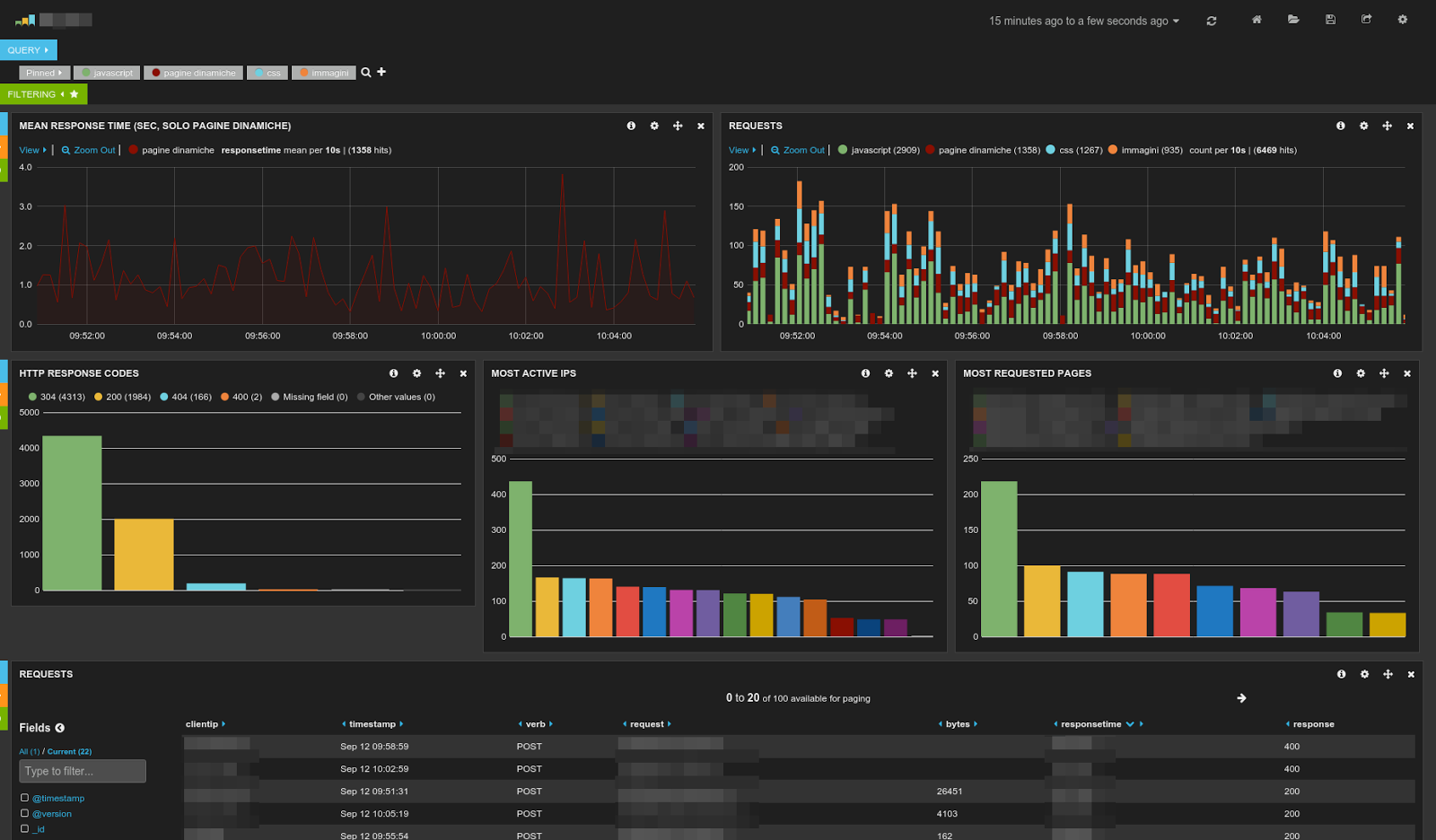
Who said that grepping Apache logs has to be boring? Sample of dashboard that can be created with ELK. Pretty impressive, huh? The truth is that, as Enteprise applications move to the browser too, Apache access logs are a gold mine, it does not matter what your role is: developer, support or sysadmin. If you are not mining them you are most likely missing out a ton of information and, probably, making the wrong decisions. ELK (Elasticsearch, Logstash, Kibana) is a terrific, Open Source stack for visually analyzing Apache (or nginx) logs (but also any other timestamped data).

Extract TABLE data from a large postgres SQL dump (with postgis)

What do you do when postgres refuses to import a dump because it contains invalid byte sequences? Solution: feed the sql script to iconv then import it as usual. That's easier said than done especially if your database contains postgis data which must be restored through a custom postgres dump (instructions here ). I recently experienced this issue on a relatively small table in a large-ish database. Since hand editing the SQL dump is cumbersome and hard (it is over 500MB in size) the only and most elegant alternative was to do it with a script. The following is an awk script which will extract the COPY instructions relative to a table from a postgres SQL dump: File: copy_estract.awk ---------------------- BEGIN {start=0} /^COPY "/ { if(index($0,TBL)!=0) { start=1; } } // {if(start==1) print $0;} /\\\./ {start=0;} Usage: awk -f copy_extract.awk -v TBL=TABLENAME pgdump/database_dump.sql One liner: awk -f copy_extract.awk -v TBL=TEST pgdump/d...

Ehcache: deploy multiple versions of a Grails app (fix javax.management.InstanceAlreadyExistsException)

When a Grails application makes use of the Ehcache cache plugin in its default configuration it can be impossibile to perform deploys of multiple versions of the app, even though the container might support it. The same plugin (in its default configuration) also breaks deploying multiple different Grails apps on the same container. The problem is in the way the plugin generates the name for the cache (which will then be used to register the cache jmx bean): the name is by default set grails-cache-ehcache . When another second application or another application version is deployed registration will fail because the name already exists. The exception message is the following (indented for clarity): org.springframework.beans.factory.BeanCreationException: Error creating bean with name 'ehCacheManagementService': Invocation of init method failed; nested exception is net.sf.ehcache.CacheException: javax.management.InstanceAlreadyExistsException: net.sf.ehcache:type=CacheM...

Create an OpenLayers map programmatically

Sometimes it is useful to abstract away the repetitive layer creation code with a configuration-based approach. For example consider this very simple map taken from the OpenLayers examples : How could we avoid repeating invoking the layer contructor and instead provde a framework that allows us to instantiate any layer with just configuration? The solution is quite simple.

Book review: Sproutcore Web Application Development

Image
TL;DR:  Sproutcore is a huge framework, and this book will save you a lot of time (and headaches). Buy it. Disclaimer : this is a review of a free copy that Packt kindly sent me. Win a free copy of this book, scroll down to know how to participate! If only I had this book 3 years ago! 3 years ago I started developing a Sproutcore app as a learning experience and, in all honesty, the path has been rough. Sproutcore is a massive  framework with lots of features: some are well documented, some mentioned casually in the guides, some others...well you don't know they are there until you start reading the code or chat with one of the more knowledgeable devs in IRC.

Easy animations with Sproutcore 1.10

The release of Sproutcore 1.10  marks an important step in the life of this very popular framework. Lots of new features make developing applications on the Sproutcore framework even easier and fun. One improvement that I am sure will catch your eye (pun intended) is  view animations . Coding view animations was rather easy also on previous versions, but with 1.10 animations are now first class citizens bolted into the core rendering subsystem. For an example of what is available out of the box see this  demo . So how would you use this goodness in an actual Sproutcore application? And how much code would it take? As an example I have put together a very basic Sproutcore app ( source , demo ) which has two states: an authentication form and a main screen. Logging in transitions the app from the login form to the main screen and logging out returns the app to the login screen. Pretty simple.

Manage Windows printer event log settings from command line (i.e. GPO scripts)

Image
Just a quick note to self that to enable/disable/query event log registration from the command line on Windows releases greater than XP and Server 2003 you can use the wevutil tool. For example to enable logging of print requests on Windows 7 for auditing purposes: wevtutil sl Microsoft-Windows-PrintService/Operational /e:true The equivalent command for the the above on Windows XP is the following: reg add HKEY_LOCAL_MACHINE\SYSTEM\CurrentControlSet\Control\Print\Providers /v EventLog /t REG_DWORD /d 7 /f net stop spooler net start spooler

Developing Sproutcore apps on c9.io

Image
The Cloud9 online IDE running on Chrome/Mac. Today I was looking for a way to quickly edit a pull request to the Sproutcore project without booting up my laptop, but using the MacMini in the living room instead, which is always on, being our main entertainment system. Turns out it's quite easy if you do not mind signing in into another online service: the  Cloud9 online IDE .